Workflow Lab
Personal Workflow Lab
Small systems I build for recurring friction: learning triage, research memory, session closeout, and practical automation.
The useful pattern is simple: understand the workflow, automate the hard part, measure whether it helps, then remove complexity when the simple version wins.
The Pattern
This is the same loop I use for public products and personal tools. AI is useful for exploration, judgement, summarisation, and messy inputs. Once the path is known, the best product is often a smaller script, clearer interface, or better handoff.
01
Notice
Find a repeated annoyance or decision point.
02
Prototype
Use the fastest tool to prove the workflow.
03
Measure
Check whether it saves time or improves judgement.
04
Simplify
Remove AI, prompts, or manual steps when they stop helping.
05
Run
Keep the working version alive with logs and alerts.
Field Notes
Outcome-led workflow cards
Learning triage
Skip the 30-minute video gamble
- Friction
- Long videos are expensive attention bets. The real question is usually whether the video contains enough useful signal to deserve the full watch.
- What I built
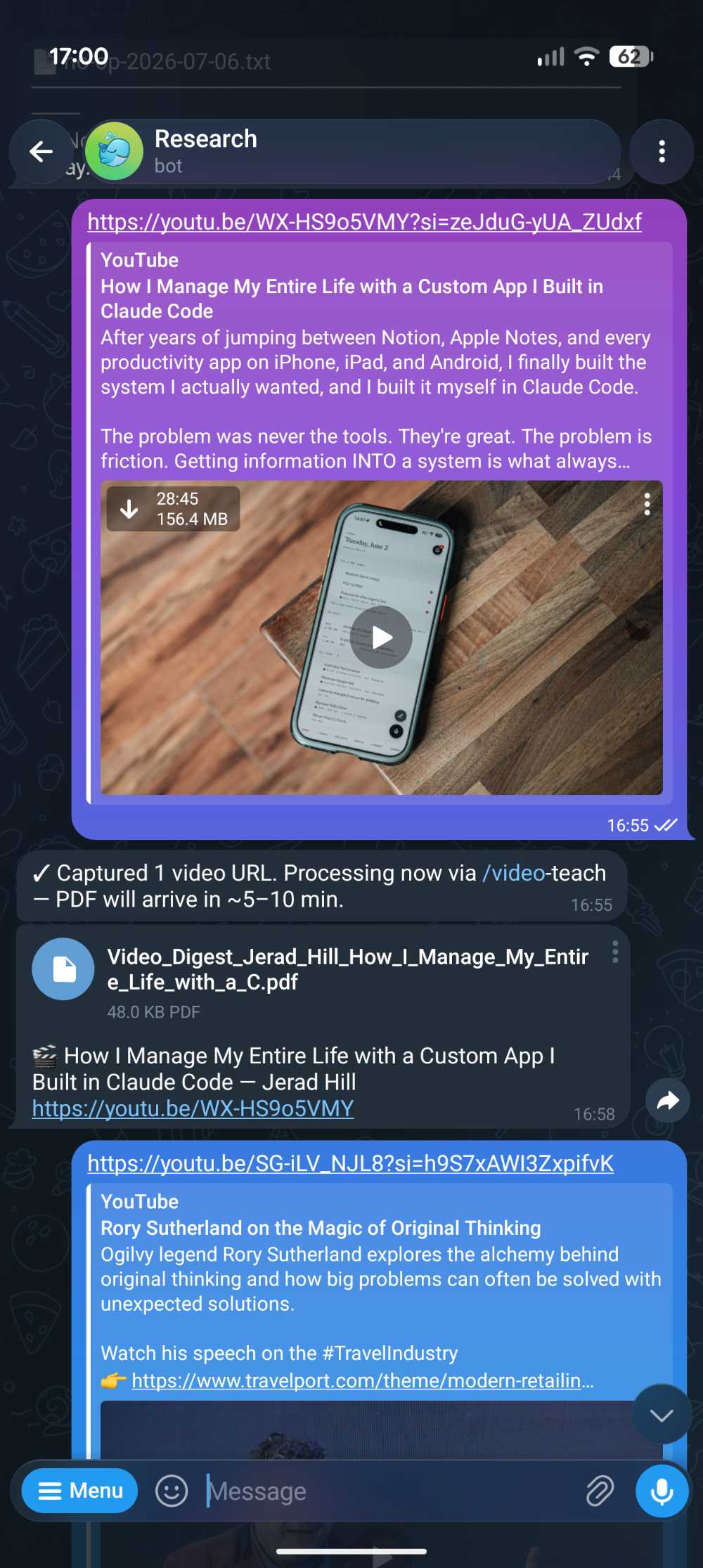
/video-teach: send a video link from Telegram, generate a structured NotebookLM-backed brief, save it to the vault, and push a phone-readable PDF back.- What changed after testing
- The output became less like a transcript and more like a judgement layer: what matters, what is weak, what to apply, and whether the full video is worth watching.
- Proof
- 27 video digests delivered.
Personal context
How the digest relates the video to me
The skill uses an explicit Oscar context pack: AI product builder, Claude Code workflows, Obsidian vault, KS Films UK, Tenant's Voice, UK English, source-backed writing, and phone-readable outputs. It keeps source summary separate from "fit with my setup" so it can explain why a video matters without pretending the video said those things.
Build it yourself
Human setup needed: create the Telegram bot, share its token and chat id with the local script, sign in to the transcript or NotebookLM tool you use, and review the first few digests manually.
- Create a Telegram bot with BotFather. Save
TELEGRAM_BOT_TOKEN, then message the bot once and fetch yourTELEGRAM_CHAT_ID. - Create folders for raw links, generated markdown, generated PDFs, and sent files. Keep the raw source separate from the digest.
- Write a
/video-teachskill that accepts exactly one video URL and refuses vague inputs. - Add a small context pack about the person using it. Keep this explicit and editable rather than letting the model guess from old chats.
- Wire a Telegram poller or webhook: detect a YouTube URL, acknowledge receipt, run the digest pipeline, render a PDF, and send the PDF back to Telegram.
- Review outputs for the first week. Tighten the prompt whenever it overclaims, misses weak points, or produces a transcript instead of a decision brief.
Full public skill prompt
/video-teach

Purpose:
Turn a YouTube or Vimeo URL into a phone-readable PDF learning brief, file the markdown/PDF into the vault, and send the PDF back to Telegram.

Modes:
- If the command receives a URL, process that one video immediately.
- If the command receives no URL, run backfill mode: find the oldest unprocessed video source notes and process the next small batch.

Validation:
- Accept only YouTube, youtu.be, or Vimeo URLs.
- Resolve title and author from oEmbed before doing expensive work.
- If metadata fails, use the video id as a fallback and say that fallback was used.

Immediate mode:
1. Validate the URL.
2. Resolve VIDEO_TITLE and VIDEO_AUTHOR.
3. Create a NotebookLM notebook named "Video Digest: VIDEO_TITLE".
4. Add the video URL as the source.
5. Wait for NotebookLM ingestion.
6. Generate a briefing-doc using the append prompt below.
7. Download the report as markdown.
8. Add YAML frontmatter with title, date, type, source URL, notebook id, and tags.
9. Add a short banner with source and generation date.
10. Render the markdown to PDF.
11. Write a Telegram caption sidecar first, then copy the PDF into the video outbox.
12. Append a video-digest log entry with URL, notebook id, source id, markdown path, PDF path, and outbox status.

Goal: produce a phone-readable learning brief, not a transcript.

Use only:
- the video transcript and metadata
- the explicit user context pack below

NotebookLM append prompt:
Frame the briefing as an action guide for an AI generalist who automates and codes AI-only at a film production company, and who runs a personal Obsidian-based knowledge vault driven by Claude Code.

Structure the output as:
1. TL;DR - one paragraph
2. How to implement - numbered, concrete steps
3. Why and when it is worth doing
4. Pros and cons - two short lists
5. Fit with my existing setup - explicit links to Claude Code workflows, vault automation, KS Films AI production, and the Tenant's Voice web product
6. Day-to-day applicability - whether this helps personally outside the projects

Do not include an Executive Summary section. Start directly with the TL;DR.
Use UK English.
No marketing language. Avoid "leverage", "seamless", "robust", "game-changer", "cutting-edge", and "delve".
Be direct. If a recommendation is weak for the user's context, say so.

User context pack:
- AI product builder working across Claude Code, Obsidian, agent workflows, RAG, and automation
- Active projects include Tenant's Voice, KS Films UK, personal research wiki, and portfolio/job materials
- Prefers UK English, source-backed claims, practical steps, and clear tradeoffs
- Wants to know whether a video deserves attention from a phone, quickly

Accuracy rule:
Do not imply the source video mentioned the user's projects. Put personalised interpretation only under "Fit with my existing setup". If context is missing, say so.

Backfill mode:
1. Read the vault log and build a covered set from previous video-digest entries.
2. Scan source notes for YouTube/Vimeo URLs.
3. Skip anything whose title or URL is already covered.
4. Pick the oldest unprocessed videos first.
5. Run the same NotebookLM, markdown, PDF, outbox, index, backlink, and log steps as immediate mode.
6. If nothing is unprocessed, write a short no-op log entry.
Research memory
Make research compound
- Friction
- Useful URLs, clipped articles, transcripts, and repo notes disappear into folders unless they are turned into structured, navigable context.
- What I built
- An Obsidian LLM wiki built from Markdown files with YAML frontmatter, contents sections, immutable source notes, maintained topic hubs, Graphify knowledge maps, and scheduled teaching digests.
- What changed after testing
- Obsidian Clipper makes capture low-friction: send the page into the inbox with URL metadata, then the LLM has enough structured source context to file it, link it, and make it findable later.
- Proof
- 89 sources ingested and reusable across projects.
Build it yourself
Human setup needed: choose the vault taxonomy, install Obsidian Clipper, decide what counts as a source, and approve the first topic hubs before automation starts editing them.
- Create a vault with three layers: immutable sources, maintained topic pages, and generated outputs. Keep raw captures separate from the wiki layer.
- Install Obsidian Web Clipper. Configure it to save article title, URL, author, date, selected text, and page body into
00-Inbox/. - Add an
AGENTS.mdor equivalent schema file that defines frontmatter, tags, wikilinks, source rules, contents sections, and log rules. - Create a source template with YAML frontmatter:
title,date,type,tags,source,authors, andstatus. - Give every topic hub a short contents section near the top so humans and agents can jump to current state, key sources, open questions, contradictions, and next actions.
- Write an ingest skill that reads inbox items, creates source notes, updates relevant topic hubs, updates the index, and appends a log entry.
- Add Graphify or another graph step after ingestion so clusters and repeated concepts are visible.
- Schedule a weekly synthesis that proposes changes first. Do not auto-apply structural edits until you trust the system.
Full public schema prompt
You maintain an Obsidian-based LLM wiki.

The vault has three layers:
1. Raw sources - immutable source notes from Obsidian Clipper, Telegram, transcripts, PDFs, repos, and manual captures.
2. Wiki pages - LLM-maintained topic hubs and concept notes.
3. Outputs - generated reports, digests, comparisons, dashboards, and filed conversation results.

Folder structure:
- 00-Inbox/ - unprocessed captures from Obsidian Clipper, Telegram, or manual notes
- 02-Research/sources/ - source notes with citations and metadata
- 02-Research/topics/ - maintained topic hubs
- 02-Research/outputs/ - generated artefacts
- 02-Research/index.md - master catalogue
- 02-Research/log.md - append-only operations log

Rules:
- Never edit raw sources
- Every source note is Markdown with YAML frontmatter
- Minimum frontmatter: title, date, type, tags, source, authors, status
- Every topic hub starts with a Contents section
- Contents should link to Current state, Key sources, Useful concepts, Contradictions, Open questions, and Next actions when those sections exist
- Topic hubs are maintained pages that connect sources and flag contradictions
- Outputs are generated syntheses, briefs, or reports
- Update index.md and append log.md after every ingest
- Use wikilinks for internal links
- Use hierarchical tags
- Use UK English
- Be direct and evidence-led

Obsidian Clipper capture rule:
When a clipped web page lands in 00-Inbox/, preserve its URL, title, author, published date if available, clipped text, and retrieval date. Do not treat clipped text as a finished source note until it has YAML, a summary, and links.

When ingesting:
1. Classify the source
2. Create the source note in 02-Research/sources/
3. Add YAML frontmatter
4. Add a short Contents section if the note is long enough to need navigation
5. Summarise the source in plain language
6. Extract key claims and caveats
7. Find related topic hubs
8. Update only the necessary hub sections
9. Update index.md
10. Append log.md with what changed

Graphify step:
After a meaningful batch of sources, run graph extraction over the relevant folder. Keep the graph output as supporting navigation, not as the source of truth. Use extracted and inferred edges carefully, and label uncertainty.
Session memory
Close the loop after each build session
- Friction
- Agent sessions create decisions, next steps, and useful debugging context that is easy to lose when the chat ends.
- What I built
/close: a closeout skill that captures durable learnings, appends project logs, identifies open tasks, and leaves the next session with a usable starting point.- What changed after testing
- The end of a build session became part of the workflow rather than admin afterthought. It keeps decisions and context from being re-discovered later.
- Proof
- Used as an operating discipline across Codex and project work.
Build it yourself
Human setup needed: decide where durable memory is allowed to live, what should stay private, and which project log format future sessions should read first.
- Create a
/closeskill or command that runs at the end of a build session. - Ask it to extract decisions, changed files, commands run, open risks, next steps, and reusable learnings.
- Separate durable memory from project-specific notes. Not every detail belongs in global memory.
- Append a short work entry to the project log with date, outcome, verification, and next action.
- Have the next session read the project log before touching files.
- Keep the closeout short. If it becomes a report, people stop using it.
Full public close prompt
/close

Purpose:
Close out a Codex or agent build session by capturing durable learnings, updating the right log, and leaving the next session with a clean handoff.

Phase 1 - Retrospective:
Scan the session for material worth keeping. Categorise each item as:
- decision - a choice future-you needs to remember
- insight - a non-obvious learning or workflow correction
- task - open work, follow-ups, deferrals
- reference - pointer to an external resource, doc, dashboard, repo, or channel
- general - useful context that does not fit above

Memory bar:
Keep only items that are non-obvious, durable, and useful in future conversations.
Skip ephemeral context, facts that can be derived from the code, and anything already written in the repo or vault instructions.

Where to write:
- User profile context goes to user memory
- Workflow corrections go to feedback memory
- Project decisions and state go to project memory
- External system pointers go to reference memory

Phase 2 - Housekeeping:
Detect the working context.

Project mode:
1. Run git status --short.
2. Run git diff --stat HEAD.
3. If uncommitted changes exist, draft an imperative commit message and ask before committing.
4. Append one entry to PROJECT_LOG.md under Work if the project uses one.
5. Do not silently edit Decisions or Open issues. Flag missing decisions to the user instead.

Vault mode:
1. Append one entry to 02-Research/log.md.
2. If wiki pages were created or substantially revised, update 02-Research/index.md.
3. If significant new source/topic content was added, suggest rerunning graph generation.

Session-only mode:
Print the retrospective summary only. Do not write logs.

Return:
1. What changed
2. Why it changed
3. Commands/tests run
4. Open risks
5. Next action
6. Durable learnings worth saving

Rules:
- Do not save secrets
- Do not write vague lessons
- Prefer concrete file paths, commands, and decisions
- If a learning is project-specific, put it in the project log, not global memory
- Keep the final note short enough to be useful next time

Final output:
1. Rename suggestion: [YYYY-MM-DD] project-or-topic - what was done
2. Counters on one line: memory updates, file operations, commits pending, logs updated
3. Nothing else
Simplification
Stop refreshing padel slots
- Friction
- Repeatedly checking court availability is low-value attention work, but missing a useful gap matters.
- What I built
- The first version used an LLM to drive browser actions and send custom parameterised messages. That proved the notification workflow and the useful filters.
- What changed after testing
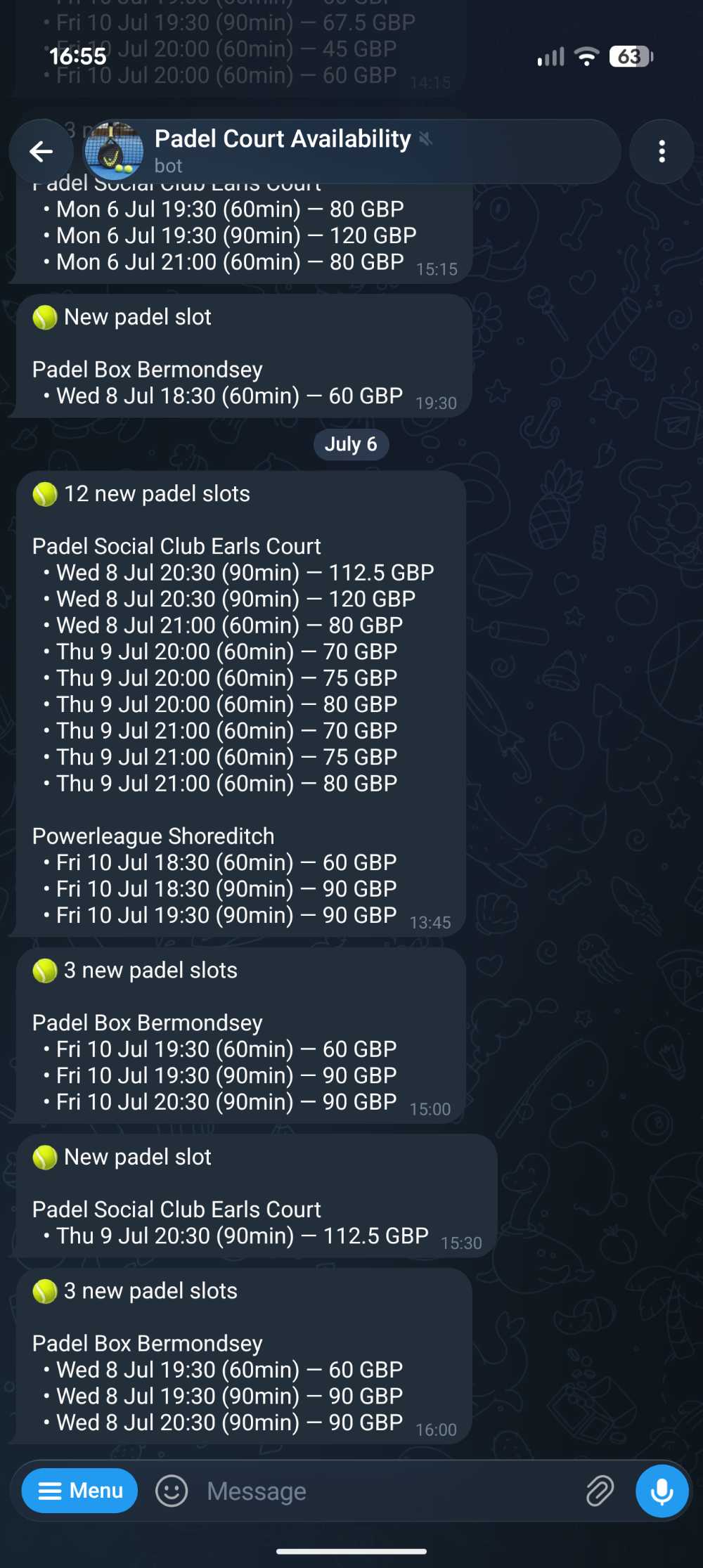
- The final version became a lightweight script hitting the exposed Playtomic API and sending Telegram alerts. Cheaper, faster, more reliable.
- Lesson
- AI helped discover the workflow; the final product did not need AI in the loop.
Build it yourself
Human setup needed: confirm the booking service has an endpoint you are allowed to use, choose venues and filters manually, and create the Telegram bot destination.
- Use the browser once to understand the workflow: venue, date range, duration, time windows, and price thresholds.
- Inspect network requests and identify whether the booking site exposes a stable availability endpoint.
- Replace browser automation with a small polling script that calls the endpoint directly.
- Store seen slot ids locally so the bot only sends new or changed slots.
- Format alerts for quick phone decisions: venue, day, time, duration, and price.
- Run it on a schedule. Add rate limits and stop polling if the endpoint errors repeatedly.
Simplification prompt starter
I have a browser workflow that checks booking availability.

Help me simplify it.

First, map the human decision:
- which venues matter?
- which dates and times matter?
- what price or duration filters matter?
- what makes a slot worth alerting?

Then inspect the technical path:
- is there an exposed API endpoint?
- what parameters does it need?
- what response fields identify a unique slot?

Final design:
- no LLM in the runtime path unless judgement is still needed
- poll the endpoint directly
- dedupe alerts
- send concise Telegram messages
- log errors and back off on repeated failures
What this proves
The capability is broader than one setup
Workflow discovery
Spot repeated friction and define the smallest useful outcome.
Retrieval and context
Turn documents, sources, and notes into grounded working memory.
Agents and automation
Use LLMs where judgement helps and scripts where the path is known.
Evaluation
Keep what improves the outcome, then remove the rest.
Positioning
I build practical systems for messy real-world workflows.
Tenant's Voice is the flagship user-facing product. The Workflow Lab shows the same product judgement at a smaller scale: find the friction, build the workflow, measure the outcome, and simplify when the simpler system wins.
View main proof points